How to convert docx/odt to pdf/html with Java?
How to convert docx/odt to pdf/html with Java? This question comes up all the time in any forum like stackoverflow. So I decided to write an article about this topic to enumerate the Java (open source) frameworks which manages that.
Here some paid product which manages docx/odt to pdf/html converters :
- Aspose.Words for Java which manages only docx converter.
- Docmosis which manages docx and odt converters.
- Muhimbi PDF Converter Services.
To be honest with you, I have not tried those solution because it’s not free. I will not speak about them in this article.
Here some open source product which manages docx/odt to pdf/html converters :
- JODConverter : JODConverter automates conversions between office document formats using OpenOffice.org or LibreOffice. Supported formats include OpenDocument, PDF, RTF, HTML, Word, Excel, PowerPoint, and Flash. It can be used as a Java library, a command line tool, or a web application.
- docx4j: docx4j is a Java library for creating and manipulating Microsoft Open XML (Word docx, Powerpoint pptx, and Excel xlsx) files. It is similar to Microsoft’s OpenXML SDK, but for Java. docx4j uses JAXB to create the in-memory object representation.
- XDocReport which provides:
- docx converters which works with Apache POI XWPF and iText 2.3.7 for PDF.
- odt converters which works with ODFDOM and iText 2.3.7 for PDF.
Here criteria that I think which are important for converters :
- best renderer : the converter must not loose some formatting information.
- fast : the converter must be the more fast.
- less memory intensive to avoid OutOfMemory problem.
- streaming: use InputStream/OutputStream instead of File. Using streaming instead of File, avoids some problems (hard disk is not used, no need to have write right on the hard disk)
- easy to install: no need to install OpenOffice/LibreOffice, MS Word on the server to manage converter.
In this article I will introduce those 3 Java frameworks converters and I will compare it to give Pros/Cons for each framework and try to be more frankly because I’m one of XDocReport developer.
If you want to compare result of conversion, performance, etc of docx4j and XDocReport quickly, you can play with our live demo which provides a JAX-RS REST converter service.
Sorry with my English!
Before starting to read this article, I would like to apologize me with my bad English. I don’t want to say « XDocReport is the best » and I don’t want to have some offence with JODConverter, docx4j, FOP guys. Goal of this article is to introduce those 3 frameworks converters and share my skills about odt and docx converters to PDF.
Download
You can download samples of docx/odt converters explained in this article :
- org.samples.docxconverters.jodconverter.zip : samples of conversion docx to PDF/HTML with JODConverter.
- org.samples.docxconverters.docx4j.zip samples of conversion docx to PDF/HTML with docx4j.
- org.samples.docxconverters.xdocreport.zip samples of conversion docx to PDF/HTML with XDocReport (Apache POI XWPF).
How to manage PDF with Java?
Here the 3 best famous Java PDF libraries:
- Apache FOP: Apache FOP (Formatting Objects Processor) is a print formatter driven by XSL formatting objects (XSL-FO) and an output independent formatter. It is a Java application that reads a formatting object (FO) tree and renders the resulting pages to a specified output. Output formats currently supported include PDF, PS, PCL, AFP, XML (area tree representation), Print, AWT and PNG, and to a lesser extent, RTF and TXT. The primary output target is PDF.
- Apache PDFBox: The Apache PDFBox library is an open source Java tool for working with PDF documents. This project allows creation of new PDF documents, manipulation of existing documents and the ability to extract content from documents. Apache PDFBox also includes several command line utilities. Apache PDFBox is published under the Apache License v2.0
- iText: iText is a library that allows you to create and manipulate PDF documents. It enables developers looking to enhance web- and other applications with dynamic PDF document generation and/or manipulation.
With iText, there are 2 versions:
- 2.3.x which is MPL License.
- 5.x which is AGPL License.
How to convert docx/odt to pdf/html with Java?
Just for information, docx and odt files are a zip which is composed with:
- several xml entries like word/document.xml (docx), content.xml (odt) which describes with XML the content of the document, styles.xml which describes used styles, etc.
- binary data for image.
To compare performance between JODConverter, docx4j, XDocReport framework converters, tests must follow 2 rules:
- logs must be disabled to ignore time of generated log (ex: docx4j generates a lot of logs which degrade the performance).
- convert twice the docx/odt to html/pdf, to ignore time of the initialization of the framework converter (ex: ignore time of connection to LibreOffice with JODConverter, ignore time of the load of JAXB classes of docx4j, etc). To compare our converters frameworks, we will convert twice the docx and will retain the last elapsed time.
To compare the result quality of the conversion, I have tried to use on each samples converters project, several docx which are designed with Table (border, rows/cols span), Header/Footer, images etc. In this article we will just study simple docx HelloWorld.docx :

But you can launch the other docx of each Java Eclipse Project to see the result of html and pdf conversion.
JODConverter with docx
To test and use JODConverter, you need to install OpenOffice or LibreOffice. In my case I have installed LibreOffice 3.5 on Windows.
org.samples.docxconverters.jodconverter Eclipse project that you can download here is sample of docx converter with JODConverter. This project contains:
- docx folder which contains several docx to convert. Those docx comes from the XDocReport Git that we use to test our converter.
- pdf and html folders where docx will be converted.
- lib folder whith JODConverter and dependencies JARs.

Download JARs
To download JODConverter JARs, download the zip jodconverter-core-3.0-beta-4-dist.zip, unzip it and copy paste the lib folder of the zip to your Eclipse Java project. Add those JARs in your classpath.
My test was done with LibreOffice 3.5 and the official distribution doesn’t work with LibreOffice 3.5 (see issue 103).
To fix this problem, I have replaced the official JARs jodconverter-core-3.0-beta-4.jar with jodconverter-core-3.0-beta-4-jahia2.jar.
HTML converter
Here the JODConverter Java code which converts twice the « docx/HelloWorld.docx » to « html/HelloWorld.html »:
package org.samples.docxconverters.jodconverter.html;

import java.io.File;

import org.artofsolving.jodconverter.OfficeDocumentConverter;
import org.artofsolving.jodconverter.office.DefaultOfficeManagerConfiguration;
import org.artofsolving.jodconverter.office.OfficeManager;

public class HelloWorldToHTML {

	public static void main(String[] args) {

		// 1) Start LibreOffice in headless mode.
		OfficeManager officeManager = null;
		try {
			officeManager = new DefaultOfficeManagerConfiguration()
					.setOfficeHome(new File("C:/Program Files/LibreOffice 3.5"))
					.buildOfficeManager();
			officeManager.start();

			// 2) Create JODConverter converter
			OfficeDocumentConverter converter = new OfficeDocumentConverter(
					officeManager);

			// 3) Create HTML
			createHTML(converter);
			createHTML(converter);

		} finally {
			// 4) Stop LibreOffice in headless mode.
			if (officeManager != null) {
				officeManager.stop();
			}
		}
	}

	private static void createHTML(OfficeDocumentConverter converter) {
		try {
			long start = System.currentTimeMillis();
			converter.convert(new File("docx/HelloWorld.docx"), new File(
					"html/HelloWorld.html"));
			System.err.println("Generate html/HelloWorld.html with "
					+ (System.currentTimeMillis() - start) + "ms");
		} catch (Throwable e) {
			e.printStackTrace();
		}
	}
}
You can notice that code uses java.io.File for docx input and html output because JODConverter cannot work with Streaming.
After running this class, you will see on the console few JODConverter logs and the elapsed time of the conversion :
Generate html/HelloWorld.html with 12109ms
Generate html/HelloWorld.html with 391ms
JODConverter converts a simple HelloWorld.docx to HTML with 391ms. The quality of the conversion is perfect.
Note that, in my case the connection to LibreOffice takes a long time (5219ms) and disconnection too.
PDF converter
Here the JODConverter Java code which converts twice the « docx/HelloWorld.docx » to « pdf/HelloWorld.pdf »:
package org.samples.docxconverters.jodconverter.pdf;

import java.io.File;

import org.artofsolving.jodconverter.OfficeDocumentConverter;
import org.artofsolving.jodconverter.office.DefaultOfficeManagerConfiguration;
import org.artofsolving.jodconverter.office.OfficeManager;

public class HelloWorldToPDF {

	public static void main(String[] args) {

		// 1) Start LibreOffice in headless mode.
		OfficeManager officeManager = null;
		try {
			officeManager = new DefaultOfficeManagerConfiguration()
					.setOfficeHome(new File("C:/Program Files/LibreOffice 3.5"))
					.buildOfficeManager();
			officeManager.start();

			// 2) Create JODConverter converter
			OfficeDocumentConverter converter = new OfficeDocumentConverter(
					officeManager);

			// 3) Create PDF
			createPDF(converter);
			createPDF(converter);

		} finally {
			// 4) Stop LibreOffice in headless mode.
			if (officeManager != null) {
				officeManager.stop();
			}
		}
	}

	private static void createPDF(OfficeDocumentConverter converter) {
		try {
			long start = System.currentTimeMillis();
			converter.convert(new File("docx/HelloWorld.docx"), new File(
					"pdf/HelloWorld.pdf"));
			System.err.println("Generate pdf/HelloWorld.pdf with "
					+ (System.currentTimeMillis() - start) + "ms");
		} catch (Throwable e) {
			e.printStackTrace();
		}
	}
}
After running this class, you will see on the console few JODConverter logs and the elapsed time of the conversion :
Generate pdf/HelloWorld.pdf with 3172ms
Generate pdf/HelloWorld.pdf with 468ms
JODConverter converts a simple HelloWorld.docx to PDF with 468ms. The quality of the conversion is perfect.
docx4j
dox4j provides several docx converters :
- docx to HTML converter.
- docx to PDF converter based on XSL-FO and FOP.
org.samples.docxconverters.docx4j Eclipse project that you can download here is sample of docx converter with docx4j. This project contains:
- docx folder which contains several docx to convert. Those docx comes from the XDocReport Git that we use to test our converter.
- pdf and html folders where docx will be converted.
- lib folder whit docx4j and dependencies JARs.
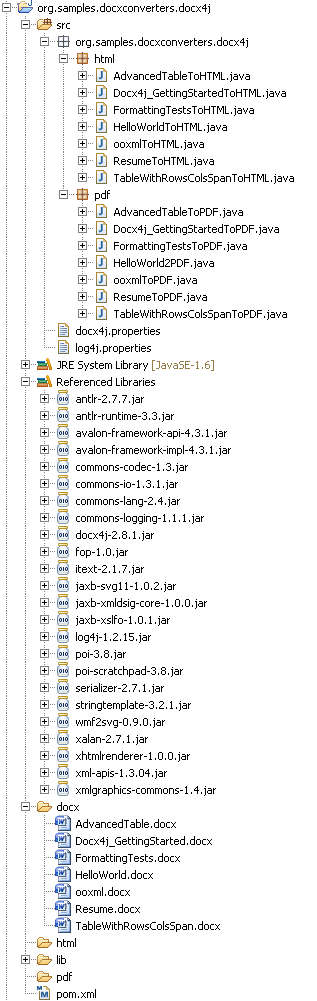
For docx4j, logs must be disabled because it generates a lot of logs which degrade the performance. To do that :
- create src/docx4j.properties like this :
docx4j.Log4j.Configurator.disabled=true
- create src/log4j.properties like this :
log4j.rootLogger=ERROR
Donload
with maven
To download docx4j and their dependencies JARS, the best mean is to use maven with this pom:
<project xmlns="http://maven.apache.org/POM/4.0.0" xmlns:xsi="http://www.w3.org/2001/XMLSchema-instance"
	xsi:schemaLocation="http://maven.apache.org/POM/4.0.0 http://maven.apache.org/maven-v4_0_0.xsd">
	<modelVersion>4.0.0</modelVersion>
	<groupId>org.samples.docxconverters.docx4j</groupId>
	<artifactId>org.samples.docxconverters.docx4j</artifactId>
	<packaging>pom</packaging>
	<version>0.0.1-SNAPSHOT</version>

	<build>
		<plugins>
			<plugin>
				<groupId>org.apache.maven.plugins</groupId>
				<artifactId>maven-dependency-plugin</artifactId>
				<version>2.1</version>
				<executions>
					<execution>
						<id>copy-dependencies</id>
						<phase>process-resources</phase>
						<goals>
							<goal>copy-dependencies</goal>
						</goals>
						<configuration>
							<outputDirectory>lib</outputDirectory>
							<overWriteReleases>true</overWriteReleases>
							<overWriteSnapshots>true</overWriteSnapshots>
							<overWriteIfNewer>true</overWriteIfNewer>
							<excludeTypes>libd</excludeTypes>
						</configuration>
					</execution>
				</executions>
			</plugin>
		</plugins>
	</build>

	<dependencies>

		<dependency>
			<groupId>org.docx4j</groupId>
			<artifactId>docx4j</artifactId>
			<version>2.8.1</version>
		</dependency>

	</dependencies>

</project>
After you can do :
mvn process-resources
and it will download the well JARs and will copy it to the lib folder.
without maven
Go at docx4j downloads.
HTML converter
Here the docx4j Java code which converts twice the « docx/HelloWorld.docx » to « html/HelloWorld.html »:
package org.samples.docxconverters.docx4j.html;

import java.io.File;
import java.io.FileInputStream;
import java.io.FileOutputStream;
import java.io.InputStream;
import java.io.OutputStream;

import javax.xml.transform.stream.StreamResult;

import org.docx4j.convert.out.html.AbstractHtmlExporter;
import org.docx4j.convert.out.html.AbstractHtmlExporter.HtmlSettings;
import org.docx4j.convert.out.html.HtmlExporterNG2;
import org.docx4j.openpackaging.packages.WordprocessingMLPackage;

public class HelloWorldToHTML {

	public static void main(String[] args) {
		createHTML();
		createHTML();
	}

	private static void createHTML() {
		try {
			long start = System.currentTimeMillis();

			// 1) Load DOCX into WordprocessingMLPackage
			InputStream is = new FileInputStream(new File(
					"docx/HelloWorld.docx"));
			WordprocessingMLPackage wordMLPackage = WordprocessingMLPackage
					.load(is);

			// 2) Prepare HTML settings
			HtmlSettings htmlSettings = new HtmlSettings();

			// 3) Convert WordprocessingMLPackage to HTML
			OutputStream out = new FileOutputStream(new File(
					"html/HelloWorld.html"));
			AbstractHtmlExporter exporter = new HtmlExporterNG2();
			StreamResult result = new StreamResult(out);
			exporter.html(wordMLPackage, result, htmlSettings);

			System.err.println("Generate html/HelloWorld.html with "
					+ (System.currentTimeMillis() - start) + "ms");

		} catch (Throwable e) {
			e.printStackTrace();
		}
	}

}
You can notice that code uses InputStream/OutputStream (Streaming) for docx input and html output.
After running this class, you will see on the console the elapsed time of the conversion :
Generate html/HelloWorld.html with 5109ms
Generate html/HelloWorld.html with 47ms
docx4j converts a simple HelloWorld.docx to HTML with 47ms. The quality of the conversion is perfect.
PDF converter
Here the docx4j Java code which converts twice the « docx/HelloWorld.docx » to « pdf/HelloWorld.pdf »:
package org.samples.docxconverters.docx4j.pdf;

import java.io.File;
import java.io.FileInputStream;
import java.io.FileOutputStream;
import java.io.InputStream;
import java.io.OutputStream;

import org.docx4j.convert.out.pdf.PdfConversion;
import org.docx4j.convert.out.pdf.viaXSLFO.PdfSettings;
import org.docx4j.openpackaging.packages.WordprocessingMLPackage;

public class HelloWorld2PDF {

	public static void main(String[] args) {
		createPDF();
		createPDF();
	}

	private static void createPDF() {
		try {
			long start = System.currentTimeMillis();

			// 1) Load DOCX into WordprocessingMLPackage
			InputStream is = new FileInputStream(new File(
					"docx/HelloWorld.docx"));
			WordprocessingMLPackage wordMLPackage = WordprocessingMLPackage
					.load(is);

			// 2) Prepare Pdf settings
			PdfSettings pdfSettings = new PdfSettings();

			// 3) Convert WordprocessingMLPackage to Pdf
			OutputStream out = new FileOutputStream(new File(
					"pdf/HelloWorld.pdf"));
			PdfConversion converter = new org.docx4j.convert.out.pdf.viaXSLFO.Conversion(
					wordMLPackage);
			converter.output(out, pdfSettings);

			System.err.println("Generate pdf/HelloWorld.pdf with "
					+ (System.currentTimeMillis() - start) + "ms");

		} catch (Throwable e) {
			e.printStackTrace();
		}
	}

}
You can notice that code uses InputStream/OutputStream (Streaming) for docx input and pdf output.
After running this class, you will see on the console the elapsed time of the conversion :
Generate pdf/HelloWorld.pdf with 16156ms
Generate pdf/HelloWorld.pdf with 219ms
docx4j converts a simple HelloWorld.docx to PDF with 219ms. The quality of the conversion is perfect.
XDocReport (Apache POI XWPF)
XDocReport provides docx converters based on Apache POI XWPF:
- docx to html converter based on SAX (and not DOM).
- docx to pdf converter based on iText 2.3.7.
Pay attention, this converter works only with docx and not with doc format. If you wish convert doc format, please see the official converter of Apache POI.
The basic idea with XDocReport (Apache POI XWPF) is to
- load docx with XWPFDocument Apache POI XWPF.
- loop for each XWPF Java structures (XWPFParagraph, XWPFTable etc) of the loaded XWPFDocument to
- generate HTML with SAX for html converter.
- generate PDF with iText structure (Paragraph, table etc).
org.samples.docxconverters.xdocreport Eclipse project that you can download here is sample of docx converter with XDocReport (Apache POI XWPF). This project contains:
- docx folder which contains several docx to convert. Those docx comes from the XDocReport Git that we use to test our converter.
- pdf and html folders where docx will be converted.
- lib folder whit XDocReport and dependencies JARs.

Donload
with maven
To download XDocReport (Apache POI XWPF) and their JARs dependencies the best mean is to use maven with this pom:
<project xmlns="http://maven.apache.org/POM/4.0.0" xmlns:xsi="http://www.w3.org/2001/XMLSchema-instance"
	xsi:schemaLocation="http://maven.apache.org/POM/4.0.0 http://maven.apache.org/maven-v4_0_0.xsd">
	<modelVersion>4.0.0</modelVersion>
	<groupId>org.samples.docxconverters.xdocreport</groupId>
	<artifactId>org.samples.docxconverters.xdocreport</artifactId>
	<packaging>pom</packaging>
	<version>0.0.1-SNAPSHOT</version>

	<build>
		<plugins>
			<plugin>
				<groupId>org.apache.maven.plugins</groupId>
				<artifactId>maven-dependency-plugin</artifactId>
				<version>2.1</version>
				<executions>
					<execution>
						<id>copy-dependencies</id>
						<phase>process-resources</phase>
						<goals>
							<goal>copy-dependencies</goal>
						</goals>
						<configuration>
							<outputDirectory>lib</outputDirectory>
							<overWriteReleases>true</overWriteReleases>
							<overWriteSnapshots>true</overWriteSnapshots>
							<overWriteIfNewer>true</overWriteIfNewer>
							<excludeTypes>libd</excludeTypes>
						</configuration>
					</execution>
				</executions>
			</plugin>
		</plugins>
	</build>

	<dependencies>
		<dependency>
			<groupId>fr.opensagres.xdocreport</groupId>
			<artifactId>org.apache.poi.xwpf.converter.xhtml</artifactId>
			<version>1.0.0</version>
		</dependency>
		<dependency>
			<groupId>fr.opensagres.xdocreport</groupId>
			<artifactId>org.apache.poi.xwpf.converter.pdf</artifactId>
			<version>1.0.0</version>
		</dependency>
	</dependencies>

</project>
After you can do :
mvn process-resources
and it will download the well JARs and will copy it to the lib folder.
without maven
You can download docx.converters-xxx-sample.zip which contains the well JARs.
HTML converter
Here the XDocReport (Apache POI XWPF) Java code which converts twice the « docx/HelloWorld.docx » to « html/HelloWorld.html »:
package org.samples.docxconverters.xdocreport.html;

import java.io.File;
import java.io.FileInputStream;
import java.io.FileOutputStream;
import java.io.InputStream;
import java.io.OutputStream;

import org.apache.poi.xwpf.converter.xhtml.XHTMLConverter;
import org.apache.poi.xwpf.converter.xhtml.XHTMLOptions;
import org.apache.poi.xwpf.usermodel.XWPFDocument;

public class HelloWorldToHTML {

	public static void main(String[] args) {
		createHTML();
		createHTML();
	}

	private static void createHTML() {
		try {
			long start = System.currentTimeMillis();

			// 1) Load DOCX into XWPFDocument
			InputStream is = new FileInputStream(new File(
					"docx/HelloWorld.docx"));
			XWPFDocument document = new XWPFDocument(is);

			// 2) Prepare Html options
			XHTMLOptions options = XHTMLOptions.create();

			// 3) Convert XWPFDocument to HTML
			OutputStream out = new FileOutputStream(new File(
					"html/HelloWorld.html"));
			XHTMLConverter.getInstance().convert(document, out, options);

			System.err.println("Generate html/HelloWorld.html with "
					+ (System.currentTimeMillis() - start) + "ms");

		} catch (Throwable e) {
			e.printStackTrace();
		}
	}
}
You can notice that code uses InputStream/OutputStream (Streaming) for docx input and html output.
After running this class, you will see on the console the elapsed time of the conversion :
Generate html/HelloWorld.html with 828ms
Generate html/HelloWorld.html with 32ms
XDocReport (Apache POI XWPF) converts a simple HelloWorld.docx to HTML with 32ms. The quality of the conversion is perfect.
PDF converter
Here the XDocReport (Apache POI XWPF) Java code which converts twice the « docx/HelloWorld.docx » to « pdf/HelloWorld.pdf »:
package org.samples.docxconverters.xdocreport.pdf;

import java.io.File;
import java.io.FileInputStream;
import java.io.FileOutputStream;
import java.io.InputStream;
import java.io.OutputStream;

import org.apache.poi.xwpf.converter.pdf.PdfConverter;
import org.apache.poi.xwpf.converter.pdf.PdfOptions;
import org.apache.poi.xwpf.usermodel.XWPFDocument;

public class HelloWorldToPDF {

	public static void main(String[] args) {
		createPDF();
		createPDF();
	}

	private static void createPDF() {
		try {
			long start = System.currentTimeMillis();

			// 1) Load DOCX into XWPFDocument
			InputStream is = new FileInputStream(new File(
					"docx/HelloWorld.docx"));
			XWPFDocument document = new XWPFDocument(is);

			// 2) Prepare Pdf options
			PdfOptions options = PdfOptions.create();

			// 3) Convert XWPFDocument to Pdf
			OutputStream out = new FileOutputStream(new File(
					"pdf/HelloWorld.pdf"));
			PdfConverter.getInstance().convert(document, out, options);

			System.err.println("Generate pdf/HelloWorld.pdf with "
					+ (System.currentTimeMillis() - start) + "ms");

		} catch (Throwable e) {
			e.printStackTrace();
		}
	}
}
You can notice that code uses InputStream/OutputStream (Streaming) for docx input and pdf output.
After running this class, you will see on the console the elapsed time of the conversion :
Generate pdf/HelloWorld.pdf with 1375ms
Generate pdf/HelloWorld.pdf with 63ms
XDocReport (Apache POI XWPF) converts a simple HelloWorld.docx to PDF with 63ms. The quality of the conversion is perfect.
Comparison
docx converters with HelloWorld
| Framework | Fast for HTML? | Fast for PDF? | Less memory intensive | Streaming | Easy to install? |
|---|---|---|---|---|---|
| JODConverter | 391ms | 468ms | Don’t know how to test that? | No | No because it requires installation of OpenOffice/LibreOffice |
| docx4j | 47ms | 219ms | OutOffMemory when memory is not enough | Yes | Yes |
| XDocReport | 32ms | 63ms | Yes | Yes | Yes |
what about with complex docx conversion?
At this step we have seen how to convert a simple docx to html and pdf with JODConverter, docx4j and XDocReport (Apache POI XWPF).
But docx can be more complex like table, paragraph, header footer, image etc. To compare the result of html and pdf conversion, you can start the other classes *ToHTML and *ToPDF inluded in the 3 projects.
It’s difficult to tell which framework converter is the best : it depends of the content of docx :
- JODConverter doesn’t manage correctly border table (see FormattingTests.docx).
- docx4j have problems with table border styled for first/end row (see AdvancedTable.docx).
- XDocReport has problems with bulleted list (see Resume.docx)
If you have problem with XDocReport, please create an issuse with your attached docx or odt by explaining your problem.
Conclusion
JODConverter
The Pros with JODConverter is that it is based on OpenOffice/LibreOffice which is a powerfull software to manage the write and convert document. The quality of the conversion is very good.
However, in my case with LibreOffice 3.5, I have several problems with docx conversion to pdf with table borders (see FormattingTests.docx), rows/cols spans (see TableWithRowsColsSpanToPDF).
The Cons with JODConverter is:
- you must install OpenOffice/LibreOffice on your server side
- you must have write rights on your server side, because it doesn’t manage Streaming.
- performance is not very good.
docx4j
Pros for docx4j is a great library to manage docx (merge several docx, compare it, etc). It provides several implemention for Conversion to PDF like FOP and iText which manages streaming and are easy to install (no need to install MS Word or OpenOffice/LibreOffice). But iText version is not official and have not a good renderer. Conversion with FOP have a good renderer.
The Cons with docx converter with FOP is:
- FOP is more slow than iText.
- with FOP you can have problems with OutOfMemory. In our case we needed to add memory on the Tomcat Server on Cloudbee for our live demo to avoid OutOfMemory.
More it uses some XSLT (for XSL-FO). I’m not a big fan with XSL : debugging XSL is very hard (debugging Java is easy). I think docx4j should switch to iText conversion implementation instead of FOP. FOP is very powerfull, but in the case of odt/docx converter I think it’s better to use iText.
I think FOP should provide the capability to create PDF with Java model like iText and not only with FO. I have posted my suggestion on FOP forum but I had had none answer.
XDocReport
Since XDocReport 1.0.0, odt/docx converters was improved a lot. There are fast, uses less memory intensive, manage streaming and are easy to install (no need to install MS Word or OpenOffice/LobreOffice).
The quality of the renderer manage a lot of cases, but it’s not magic and there are again problems like with table border, bullet-ed/numbered list shapes which are not managed.
HTML converters should be more improved (manage table border, bullet-ed/numbered list etc).
Note that XDocReport provides a REST Converter services (you can use XDocReport (Apache POI XWPF) or docx4j). With this feature you can use those converter with any technologies like PHP, C#, Python, etc by developping a REST client.
What about with odt converter?
To convert odt to PDF or HTML, you can use :
- JODConverter.
- XDocReport (ODFDOM) converter for convert odt to PDF or HTML. To test those converter you can :
Laisser un commentaire


 Angelo's Blog
perfect piece of software!
Seems to work indeed and is quite fast. Impressive 🙂
Hi! Thank you for a good article ! But i have a question…
How to convert html to pdf (and rtf) using the docx4j and JODConverter library ?
Can you give a simple example ?
Thank U!
This article was not about html -> X converter. I have never done that, sorry I cannot help you.
Ok, thanks!
sorry, but I have another question. I run your example « without maven, docx4j, HTML converter », but I get an error « java.lang.NoClassDefFoundError:org/slf4j/LoggerFactor »Tell me please how to fix it? Thank you!
Tomas, go to this link – http://code.google.com/p/flying-saucer/
Just try some. I have tried it and it worked for me. Hope it works for you too
There is a 100% Java library called jWordConvert by Qoppa Software that can convert Word (doc and docx) documents to PDF.
http://www.qoppa.com/wordconvert
The java code is simple:
// Load the Word document
WordDocument wdoc = new WordDocument (« input.doc »);
// Save the document as a PDF file
wdoc.saveAsPDF (« output.pdf »);
It costs $350 for a server, so it may be the work and setup above.
And you don’t have to have open office running on your server.
Hi Lilou,
My article was focus on Open Source project and not paid product like jWordConvert.
I’m not sure but I think I have tried the online demo jWordConvert and it crashed with complex docx.
Regards Angelo
Nice article. Do you know of any library that would support all word format ppt pptx xls xlsx…. This seems like a very challenging issue.
Many thank’s.
I’m sorry I don’t know library which supports ppt, pptx etc.
XDocReport could support pptx, xlsx (but not ppt, xls) like we have done with docx, but it’s a big hard task.
Today I have no motivation (and not need) to do that.
Regards Angelo
I am using xdocreport API in my project. I am mainly satisfied with it. It is easy to use and it is really easy to make the pdf report. But there is one problem that I have to solve. Sometimes the pdf generation does not work. The program stops at this line:
PdfConverter.getInstance().convert
I do not know why the program freezes at that point. It seems as it is running forever and maybe this method has got infinite loop, maybe there is some lock inside of it. Can you help me by pointing me what can be wrong. When this happens the only thing that helps is the restart of the application sever on which this code is running.
Thanks in advance.
Hi Jelena,
It’s hard to help just with « sometimes » information. It should be cool if you give us more information.
Please post your problem in the XDocReport issues https://code.google.com/p/xdocreport/issues/list.
Regards Angelo
Hi Angelo, Many Thanks fro Great artical.
All examples are work fine and I enjoy it. But I have one issue,
When I use Unicode fonts, It doesn’t into the pdf. am I trying to do impossible things?
Hi,
If your problem comes with XDocReport, I suggest you to create an issue at https://code.google.com/p/xdocreport/issues/list by attaching your docx.
Regards Angelo
This is nice Angelo – One question – why you have createPDF();
createPDF();
I mean two times – createPDF();
createPDF();
Just saw it in your article. Thank you.
Hi Angelo,
Cool!!!! Thank you very much..
Im using XDocReport but it doesn’t convert bullet & shape
do you have any experience with those objects?
Hi DM,
Converting shape is not in the XDocReport scope (for the moment) because it’s a very big task and we have no time to do that.
The XDocReport converters was developped to manage simple reporting so shape are not used in this case (if you need it, you can insert a simple image).
bullet should be converted but I know (for docx) that there are some bugs again. Please create issue at https://code.google.com/p/xdocreport/issues/list with your attached docx/odt which causes the problem.
Regards Angelo
Hi Angelo,
Great article!
I have a question: let’s assume I have an odt or docx document with multiple pages. Can I convert only one page to HTML using xdocreport? For example, page 10?
Thanks.
Regards,
Jair Jr
Hi Jair,
No it’s not possible because teh ooxml docx doesn’t contains this information. You have just a word/document.xml which contains the content of your document but not pages.
Pages can be generated with PDF but not with HTML.
Regards Angelo
Hi Angelo,
Thank you for your answer,
Regards,
Jair Jr
Aspose.Words for Java is not free but offers free trial and i have tried their free trial and its works great and after using trial for 2 weeks i purchase one of their packages and i am very satisfied with it and the best thing about Aspose is that you can request a feature on their forum and they are very quick in their response. So, so far i am liking Aspose.
Hi Angelo,
In performance comparison table you wrote XDocReport is more performant than others. But i have seen XDocreport either uses Apache POI or Docx4j internally. Could you please tell me when you wrote XDocReport which unerlying framework you are reffering? Is there any performance gain when someone use XDocReport with Docx4j?
The main goal of XDocReport is to generate report and convert it to other format. XDocReport is very modular, so it’s possible to implement converter with any API converter. As you have seen, we have implemented 2 converters :
* with docx4j : in this case we use the docx4j converter based on FOP.
* with POI+iText : in this case we have developed this converter on our thirparties https://code.google.com/p/xdocreport/source/browse/#git%2Fthirdparties-extension
So we could implement too a converter based on JODConverter (see issue at https://code.google.com/p/xdocreport/issues/detail?id=73)
On other words, in this article I speak about our thirparties POI+iText converter that it is used just to convert odt/docx to pdf/xhtml and not about XDocReport IConverter API that it is used when report is generated and must be converted.
Good analysics
I really appreciate you writing this; however, it’s very difficult to know how to actually run the examples that you have. Not knowing how Java handles paths and JARs very well, I spent a very long time trying to figure out what options I should use, and then when I finally got it to run, it took 32 seconds (!) and also produced a file with the wrong font 😦 Maybe I’m doing it wrong? Something like a Makefile with a « test » command would be incredibly helpful! 🙂
zip attached which are eclipse project with well JARs are not enough?
> I finally got it to run, it took 32 seconds (!) and also produced a file with the wrong font
Our XDocReport converters are not perfected. If you have problems please create issues at XDOcReport with your attached docx/odt.
Hi… Help me please, when I run the proyect with netbeans and try to converter doc to pdf,
operating correctly… And I build the proyect and generate a .jar file…
But, when I excecute the .jar, when I try to converter it´s doesn´t convert…
What I can do to resolve this problem?
Also based on OpenOffice: http://www.dancrintea.ro/doc-to-pdf/
Hello Angelo. T continue the discussion from the POI user list, ther are two other possible techniques. One is to use AbiWord; this is limited to files produced by word processing packages but it does include one of the best – in my opionion – Word parsers. The second is to use either OLE\COM to control an insrance of Word or Excel and rely on that to convert the files for you. Alternatively, use OpenOffice and control an instance of that application via it’s UNO interface. The latter is how JODConvertor works I believe. If you want examples of Word\Excel OLE and the UNO approach to file conversions, just let me know and I will try to look them out on my PC.
Yours
Mark B
Really nice work. can you let me know how to extract only style information from a Office document ( word, excel or powerpoint ) so that i can get text and style seprately pulled.
Hi, i’m searching a way to convert my XLSX to a PDF. I tryed your samples using my XLSX instead of your DOCX, but it throws an exception. Could you suggest me or give me some honts?
XDocReport converter support only docx. Try other converters like JODConverter.
Is it possible to convert HTML files to either .doc or.pdf format..Any suggestions…..
Dear angelozer,
your article is very good. Is there any way to convert html to docx. please answer……
I cannot help you for html->docx converter, because I never needed that.
XDocReport provides an HTML text styling but it’s very basic (just for style mergefield to replace with HTML).
how to convert from pdf file to html file?
This article was just about docx/odt to html/pdf converters.
Never done pdf->html. I cannot help you.
You should write a post about the opposite conversion: html/pdf to docx/odt.
A lot of people are searching for that and they find your website on Google first page.
My article is about » How to convert docx/odt to pdf/html with Java » and not the opposite conversion, because I would like to compare XDocReport converters with other converters.
XDocReport needs for reporting docx/odt to pdf/html converters and not the opposite, so I have no idea how to convert pdf/html to docx/odt.
Hi
Is it possible that it works only at 64bit system? Cause I implement your code into mine. And it works wonderful in my comp. But in my m8 comp doesont work and he has got 32 bit system.
Dear angelozer,
i’ve much appreciated your article.
I’m looking for any solution for generate pdf with template or manipulate existing pdf with dynamic data.
I know that with iText it is possible to set placeholder in existing pdf document, but i know that with this approach there are also problems with text formatting, reposition of text and paragraphs.
In addition I need insert table dynamically filled from datasource and I don’t know if it’s possible.
Do you know some framework who allow to manipulate PDF?
Or it’s is better to edit original documents (docx/odt) and then recreate the pdf?
Thank’s a lot
Ste
I think if you need perfect and complex PDF, I suggest you to use iText directly, because you will not find a perfect docx/odt -> pdf converter.
If your template must be customized by a customer (non developer) and it is not very complex, I think XDocReport is a good solution (we have created this project for that).
I suggest you that you read article http://www.blackpepper.co.uk/pdf-templating-with-docxreport/
Hi Angelo, Thanks for a detailed analysis and examples for comparing different libraries to convert OOXML documents to pdf/html.
Thanks for the info, helped me a lot.
Hi i have gone through the article. i tried with the 2 of the frameworks mentioned, that is docx4j and xdocreport. i downloaded and tested with my simple docx files it worked fine. then i tried with one complex word document but it did not work fine throwing error. the error is :- Expecting one Styles document part, but found 0
i tried with the above mentioned two but the error is same.
i didnt tried with the first one because i dont have the expected software installed in my machine.
i tried with jword also, but there is no use.
when i tried to convert it online it got converted to pdf, perfectly.
i dont have your email to mail you the file iam using.
can you please help me in this.
can you p;ease change the language to English. since i could not understand the language at the time of posting this comments.
Thanks.
I have use docx 4j and Apache POI for converting doc to html, it converts well, but If there is some footnotes with special characters in doc then it did not retain in HTML. So Is there any method for converting doc to html with footnotes.
Hi im tryin gto convert xlx, or xlsx file to pdf .. Im unable to convert anybody help to find way to go through asap?
hi,
is those converters (docx4j, jodconverter and xdocreport) can convert ‘doc, ppt, xls. i tried them for docx, pptx, xlsx. it works good, but dosn’t work for others.
any help plz
hi,
can those converters (docx4j, jodconverter and xdocreport) convert ‘doc, ppt, xls’ to pdf. i tried them for docx. it works good, but dosen’t work for the others.
any help plz
Hi guys,
I’m trying to convert my odt document to pdf with XDocReport (ODFDOM) converter.
My document was generated with ODT with Freemarker method.
– Freemarker v. 2.3.20
– xdocreport v 1.0.2
For conversione I’m looking here: https://angelozerr.wordpress.com/2012/12/06/how-to-convert-docxodt-to-pdfhtml-with-java/ and download the odt.converters-1.0.2-sample.zip here https://code.google.com/p/xdocreport/downloads/list. (same results even with version 1.0.4).
Unfortunately, the conversion is not successful and these are the error log:
org.odftoolkit.odfdom.converter.core.ODFConverterException: java.lang.RuntimeException: Not all annotations could be added to the document (the document doesn’t have enough pages).
at org.odftoolkit.odfdom.converter.pdf.PdfConverter.doConvert(PdfConverter.java:82)
at org.odftoolkit.odfdom.converter.pdf.PdfConverter.doConvert(PdfConverter.java:43)
at org.odftoolkit.odfdom.converter.core.AbstractODFConverter.convert(AbstractODFConverter.java:42)
at fr.opensagres.xdocreport.samples.odt.converters.pdf.ConvertODTas400ToPDF.main(ConvertODTas400ToPDF.java:198)
Caused by: java.lang.RuntimeException: Not all annotations could be added to the document (the document doesn’t have enough pages).
at com.lowagie.text.pdf.PdfDocument.close(Unknown Source)
at com.lowagie.text.Document.close(Unknown Source)
at org.odftoolkit.odfdom.converter.pdf.internal.stylable.StylableDocument.close(StylableDocument.java:380)
at org.odftoolkit.odfdom.converter.pdf.internal.ElementVisitorForIText.save(ElementVisitorForIText.java:685)
at org.odftoolkit.odfdom.converter.pdf.PdfConverter.processBody(PdfConverter.java:128)
at org.odftoolkit.odfdom.converter.pdf.PdfConverter.doConvert(PdfConverter.java:65)
… 3 more
Generate ODTBig.pdf with 3066 ms.
Some ideas?
needs update it has been 3 years
Is there sample code to convert pptx to pdf using xdoc report?
XDocReport doesn’t provide this kind of converter pptx -> pdf. Any contribution are welcome!
Great resource and article. Thanks. Merci!
Great Article. I am using Xdocreport for my project and facing an issue while converting the docx file to pdf. It skips the highlighted words in the docx. Any help will be appreciated.
I highly recommend you documents4j, http://documents4j.com/#/ Its free and the best conversor for docx-pdf that i have ever found
Hi Angelo
I am trying to create a PDF file that has some data from my Java gui. I have already created a docx file using XWPFDocument in java and want to convert it to PDF. Is there a way to do that using PDFBox?
Thanks!
I have studied to do the same iText converter with PDFBox, but PDFBox doesn’t provide a DOM-like PDF document. Today I don’t know. I suggest you that you post this question to PDFBox forum.
hi i am not able to find the zip folders for downnload
It’s because I used Dropbox and now my folders are private -( I must find a website where I could host my zips.
The greatest article by far I have seen. Than you so much for insightful knowledge at single place. By seeing code snapshots, I have managed to write up the code, but by any chance, Could you be able to share the zips of code? That would be very grateful.
I used dropbox to download my zip but it seems that dropbox doesn’t provide this support today -(
hiii….
your post is sooo useful.
thanks for it.
but i have table format and image and somewhere two cell using as one so its very difficult to convert, i read some of other post in that i found i have to convert that excel file first into HTML than go for pdf is it wright way ? and any help and suggestion appreciated .
thanks
Do you have suggestion to convert .doc file to .pdf?
Hi Angelo,
I am using below versions of jars and still getting an exception. Could you please suggest?
implementation ‘fr.opensagres.xdocreport:org.apache.poi.xwpf.converter.xhtml:1.0.5’
implementation ‘fr.opensagres.xdocreport:org.apache.poi.xwpf.converter.pdf:1.0.5’
implementation ‘org.apache.poi:poi-scratchpad:3.10-FINAL’
implementation ‘org.apache.poi:poi:3.10-FINAL’
implementation ‘org.apache.poi:poi-ooxml:3.10-FINAL’
Exception :
java.lang.IllegalAccessError: tried to access method org.apache.poi.util.POILogger.log(ILjava/lang/Object;)V from class org.apache.poi.openxml4j.opc.PackageRelationshipCollection
at org.apache.poi.openxml4j.opc.PackageRelationshipCollection.parseRelationshipsPart(PackageRelationshipCollection.java:304)
at org.apache.poi.openxml4j.opc.PackageRelationshipCollection.(PackageRelationshipCollection.java:156)
at org.apache.poi.openxml4j.opc.PackageRelationshipCollection.(PackageRelationshipCollection.java:124)
at org.apache.poi.openxml4j.opc.PackagePart.loadRelationships(PackagePart.java:559)
at org.apache.poi.openxml4j.opc.PackagePart.(PackagePart.java:112)
at org.apache.poi.openxml4j.opc.PackagePart.(PackagePart.java:83)
at org.apache.poi.openxml4j.opc.PackagePart.(PackagePart.java:128)
at org.apache.poi.openxml4j.opc.ZipPackagePart.(ZipPackagePart.java:78)
at org.apache.poi.openxml4j.opc.ZipPackage.getPartsImpl(ZipPackage.java:188)
at org.apache.poi.openxml4j.opc.OPCPackage.getParts(OPCPackage.java:623)
at org.apache.poi.openxml4j.opc.OPCPackage.open(OPCPackage.java:230)
at org.apache.poi.util.PackageHelper.open(PackageHelper.java:39)
at org.apache.poi.xwpf.usermodel.XWPFDocument.(XWPFDocument.java:120)
at com.test.Test1.convertDocxToPDF(Test1.java:122)
at com.test.Test1.main(Test1.java:70)